Investment research is tedious and non-sequential, which makes it costly and difficult to automate. The engine I built aims to enable a powerful and cost-efficient way of conducting financial research. It combines AI and external data services through an agent-based operating model.
As an avid reader of publications from Hindenburg Research, and following its closure, along with the founder’s promise to share information about their internal processes, I decided to try setting up my own research team.

Except everyone on the team is named Claude.
Agents, agentic frameworks, and model providers were rapidly delivering more ways to build such systems. I wanted to experiment with it, and just two weeks after I started, Anthropic published this blog post: https://www.anthropic.com/engineering/multi-agent-research-system
It’s a clear article showcasing what the future of AI could look like: not a single agent processing your entire query, but multiple specialized ones—each with its own task and expectations. Essentially, you break the model’s sequential thinking and enable more back-and-forth interaction with greater subtlety, depending on the desired outcome. Add tools to these agents, such as code execution, file management, web search, or data querying, and you have a complex organization capable of processing tasks through many steps.
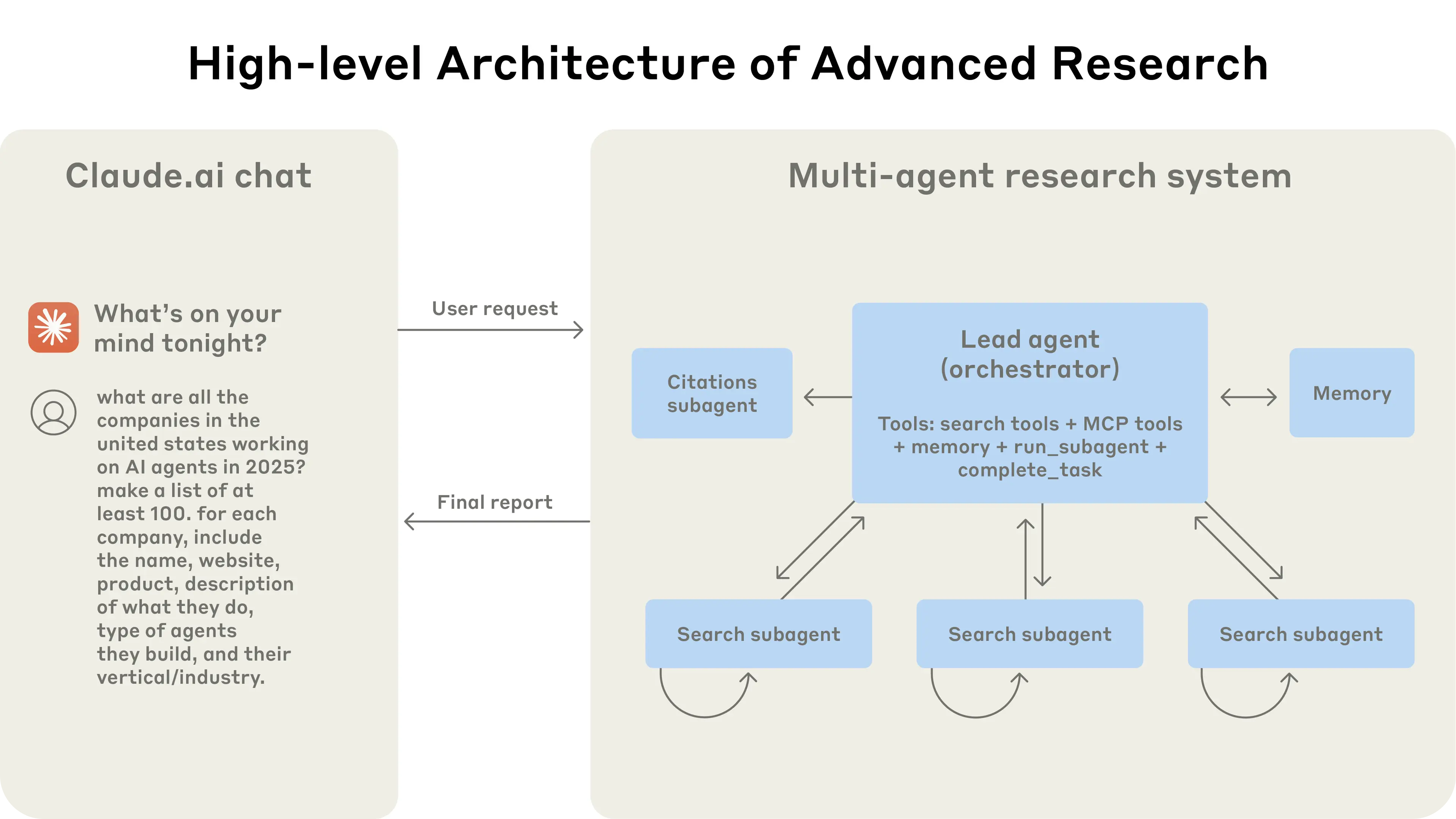
From there, the goal was to produce financial research through a network of agents that interact with one another and connect to external data sources. I chose to focus on short-selling research because of its inherently non-sequential nature.
When buying equity, you are often faced with a fairly textbook, linear approach, at least at the surface level. Short selling, of course, involves some similar checks, but it quickly forces you to reevaluate your path based on new information you uncover. This view can be debated, but fraud discovery generally follows a less sequential path than the discovery of strong performance.
Goals
- Build a multi-agent system using the Anthropic API.
- Integrate real financial data sources (starting with the AMF database for French-listed companies).
- Generate structured short-thesis reports on demand.
Process
- Define our architecture
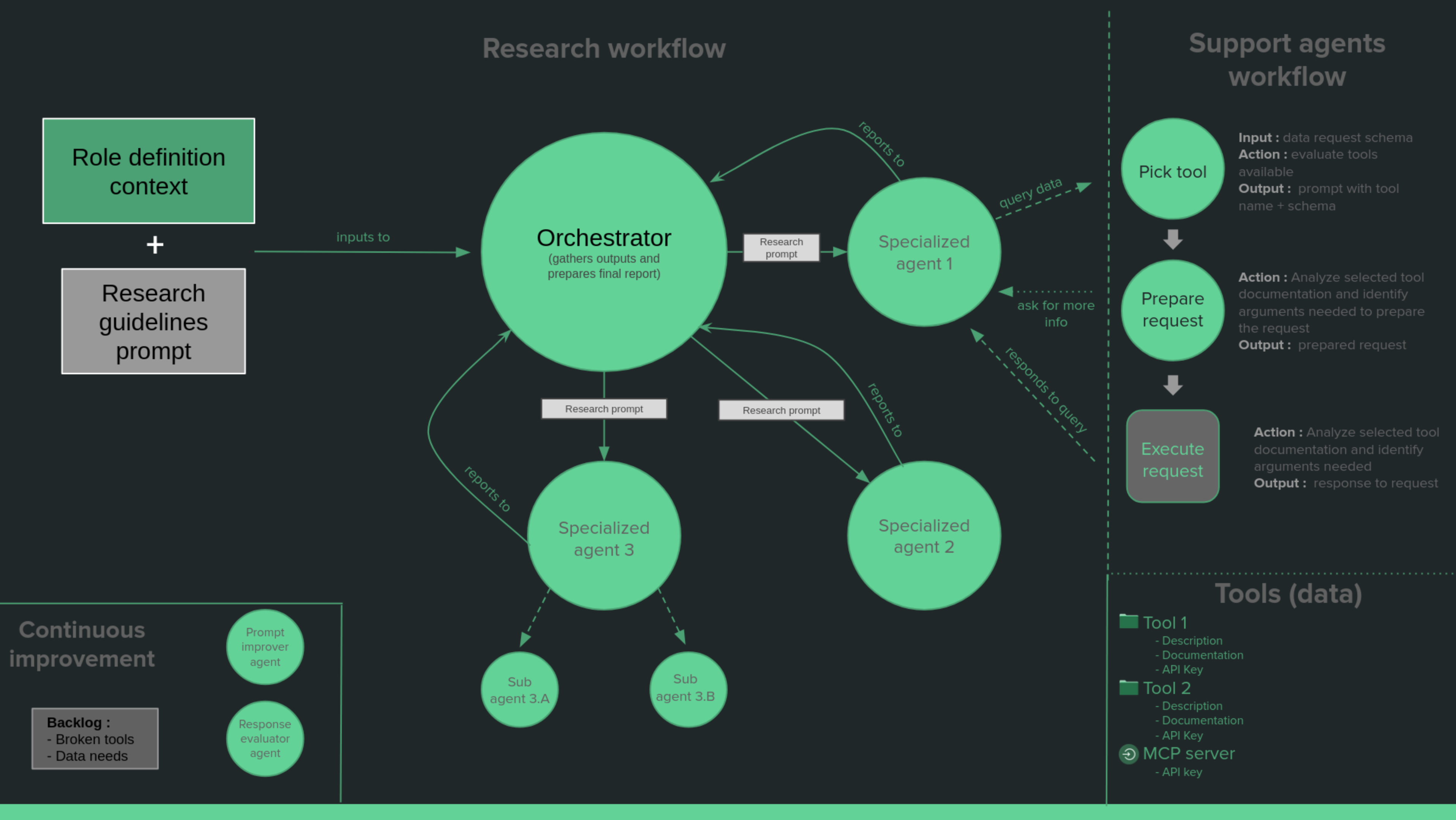
An orchestrator agent articulates a research path, it handles the project, distributes tasks and review them. He does not handle research directly, meaning he does not search for information. This agent is built through three components :
- A system prompt, please find more details here : https://docs.anthropic.com/en/docs/agents-and-tools/tool-use/overview
- A research prompt, basically dynamic context depending on the specific research we want to produce. Introduce him to the company, and how we may want to approach it.
- A list of tools it can use, please find more info about tools here : https://docs.anthropic.com/en/docs/agents-and-tools/tool-use/overview
What it looks like in the code, we define the tools :
//Define the tools available
	toolParams := []anthropic.ToolParam{
		{
			Name:        "pick_tool",
			Description: anthropic.String("Accepts a request schema to obtain needed data from internal tools, then returns the data if obtainable."),
			InputSchema: PickToolInputSchema,
		},
		{
			Name:        "sub_agent",
			Description: anthropic.String("This tool allows to create sub-agents by providing a task prompt, system prompt, files and their associated type, PDF URLs, and a list of usable tools, allowing the sub-agents to perform specialized tasks autonomously."),
			InputSchema: SubAgentInputSchema,
		},
	}
	tools := make([]anthropic.ToolUnionParam, len(toolParams))
	for i, toolParam := range toolParams {
		tools[i] = anthropic.ToolUnionParam{OfTool: &toolParam}
	}
And pass them with our system prompt to create an agent.
	//Get and use the system prompt
	systemPromptText, err := utils.ReadMarkdownFile("./SystemPrompt.md")
	if err != nil {
		log.Fatal(err)
	}
	systemPrompt := anthropic.TextBlockParam{
		Text: systemPromptText,
	}

	for {
		//Call the Claude agent with the conversation struct
		message, err := client.Messages.New(context.TODO(), anthropic.MessageNewParams{
			Model:     anthropic.ModelClaudeOpus4_1_20250805, // anthropic.ModelClaude3_5Haiku20241022, ModelClaude3_7SonnetLatest
			MaxTokens: 6096,
			Messages:  messages,
			System:    []anthropic.TextBlockParam{systemPrompt},
			Tools:     tools,
		})

		........
	}
- Add research agents
The orchestrator agent can use the SpawnAgent tool. It allows it to create an agent and pass it a system prompt, a prompt and tools. The available tools being :
- SpawnAgent tool, in a similar way to the Orchestrator, the spawned agent can also spawn agents.
- WebSearch too, allows to search the web. A number of maximum search queries must be set in order to not end up wasting resources.
- PickTool agent, this tool is actually an AI agent which can be sollicited by our agent in order to provide him with an internal tool/data source to solve its request.
func CreateSubAgent(prompt, systemPrompt string, filesPaths []string, pdfURLs []string, toolsList []string)
- Add support agents
The PickTool agent serves as the initial contact point in the support agents workflow, designed to assist research agents with their tooling needs. This agent operates by accessing an XML file containing a catalog of available tools with brief descriptions, then retrieving detailed documentation for each tool as needed.
A concrete example is the French financial database from the Autorité des Marchés Financiers (AMF), which provides access to financial reports from publicly listed companies. The integration process involved providing the agent with:
- A markdown file explaining the API usage
- A JSON Swagger specification
- Authentication tokens when required

This setup essentially granted the agent autonomous access to the entire database. The agent could construct GET requests, execute them through a hardcoded function (this was before native code execution became available), and summarize the results for the requesting agent. It’s worth noting that integrating data sources presented various challenges, and the complexity varied significantly across different implementations.
Additional Agents were considered to further implement division of labor and improve performance through focused scope:
- A Prompt Improver Agent: To enhance query quality
- A Response Evaluator Agent: To assess output quality
- A Jira Agent: To create tickets for human intervention when issues arose (this was not implemented due to MCP server issues at the time)
- Produce a pdf
I used the github.com/jung-kurt/gofpdf library. Every time I need one I always feel overwhelmed by the sheer complexity of what appears so generic nowadays.
Additions
- Build an UI
For the frontend I relied on Claude code which was just released at the time. It honeslty did an impressive work and was able to keep it simple.
- Allow X login
With the aim of having people from the tech sphere testing it I wanted people to be able to log in through Twitter. The main reason was cost, opening an AI agent to the web is welcoming problems
- Generate a promotional video with Veo
Using the Veo model from Google I obtained the following result.
Results
You can access the source code here : https://github.com/Mathiasme/ClaudeShorts. It would probably be a struggle to run the UI as you’d need the whole X api setup. Globally it worked, and was able to pull basic data from the AMF and the web.
Review
In multi-agent systems, the majority of the effort goes into system design: defining roles, crafting system prompts, determining data access, and mapping workflows. Essentially, you’re building both an organizational model and an operating model.
This translates directly to the corporate world. Even in an AI-driven environment, organizational management remains critical. Clear expectations, responsibilities, relationships, and roles must still be defined.
Companies with well-defined organizational and operating models—and with properly exposed data and applications—are now at a significant advantage. They can rapidly iterate on their structure, integrate AI agents seamlessly, and track performance through clear KPIs.
When it comes to what I learned :
- Building alongside evolving tools is challenging. Working with models and APIs that are still under development means dealing with sparse documentation, waiting for bug fixes, and anticipating new features.
- Code-based AI agent integration works well. Implementing agents programmatically offers strong control and flexibility.
- Data source integration is harder than expected. Connecting to existing databases and systems presents more friction than anticipated.
- API costs escalate quickly. There’s a noticeable disparity: consumer-facing interfaces appear heavily subsidized. For example, asking Copilot a question might trigger 10 web searches and a summary at no visible cost, whereas running the same workflow through Claude’s API quickly accumulates charges.